 SUN
简介
OOM(OutOfMemoryError),最近线上版本出现了大量线程OOM的crash,尤其是华为Android 9.0系统的手机,占总OOM量的85%左右。
内存指标概念
- USS(Unique Set Size): 物理内存,进程独占的内存
- PSS(Proportional Set Size): 物理内存,PSS = USS + 按比例包含共享库
- RSS(Resident Set Size): 物理内存,RSS = USS + 包含共享库
- VSS(Virtual Set Size): 虚拟内存,VSS = RSS + 未分配实际物理内存
OOM分类
[XXXClassName] of length XXX would overflow“是系统限制String/Array的长度所致,这种情况比较少。
java.lang.OutOfMemoryError: "Failed to allocate a " << byte_count << " byte allocation with " << total_bytes_free << " free bytes and " << PrettySize(GetFreeMemoryUntilOOME()) << " until OOM";
通常情况下是因为java堆内存不足导致的,即Runtime.getRuntime().maxMemory()获取到的最大内存无法满足要申请的内存大小时,这种情况比较好模拟,例如我们可以通过new byte[]的方式来申请超过maxMemory()的内存,但是也有一些情况是堆内存充裕,而且设备内存也充裕的情况下发生的。
java.lang.OutOfMemoryError: Could not allocate JNI Env(代号JNIEnv)
- cat /proc/pid/limits 描述linux系统对对应进程的限制:
Limit                     Soft Limit           Hard Limit           Units
Max cpu time              unlimited            unlimited            seconds
Max file size             unlimited            unlimited            bytes
Max data size             unlimited            unlimited            bytes
Max stack size            8388608              unlimited            bytes   // 整个系统的
Max core file size        0                    unlimited            bytes
Max resident set          unlimited            unlimited            bytes
Max processes             17235                17235                processes // 整个系统的最大进程数,底层只有进程,线程也是通过进程实现的
Max open files            32768                32768                files   // 每个进程最大打开文件的数量
Max locked memory         67108864             67108864             bytes   // 线程创建过程中分配线程私有stack使用的mmap调用没有设置MAP_LOCKED,所以这个限制与线程创建过程无关
Max address space         unlimited            unlimited            bytes
Max file locks            unlimited            unlimited            locks
Max pending signals       17235                17235                signals   // c层信号个数阈值,与线程创建过程无关
Max msgqueue size         819200               819200               bytes
Max nice priority         40                   40
Max realtime priority     0                    0
Max realtime timeout      unlimited            unlimited            us
里面Max open files表示每个进程最大打开文件的数目,进程每打开一个文件就会产生一个文件描述符fd(记录在/proc/pid/fd中)
验证: 触发大量的网络连接或者打开文件,每个连接处于独立的线程中并报出,每打开一个socket都会增加一个fd
  private Runnable increaseFDRunnable = new Runnable() {
      @Override
      public void run() {
          try {
              for (int i = 0; i < 1000; i++) {
                  new BufferedReader(new FileReader("/proc/" + Process.myPid() + "/status"));
              }
              Thread.sleep(Long.MAX_VALUE);
          } catch (InterruptedException e) {
              e.printStackTrace();
          } catch (FileNotFoundException e) {
              e.printStackTrace();
          }
      }
  };
java.lang.OutOfMemoryError: pthread_create(1040KB statck) failed: Out of memory(代号1040)
根据OOM的crash日志,我们发现都是从Thread.start()方法开始的,
  public synchronized void start() {
      /**
       * This method is not invoked for the main method thread or "system"
       * group threads created/set up by the VM. Any new functionality added
       * to this method in the future may have to also be added to the VM.
       *
       * A zero status value corresponds to state "NEW".
       */
      // Android-changed: throw if 'started' is true
      if (threadStatus != 0 || started)
          throw new IllegalThreadStateException();

      /* Notify the group that this thread is about to be started
       * so that it can be added to the group's list of threads
       * and the group's unstarted count can be decremented. */
      group.add(this);

      started = false;
      try {
          nativeCreate(this, stackSize, daemon);
          started = true;
      } finally {
          try {
              if (!started) {
                  group.threadStartFailed(this);
              }
          } catch (Throwable ignore) {
              /* do nothing. If start0 threw a Throwable then
                it will be passed up the call stack */
          }
      }
  }
上面的核心方法是nativeCreate(this, stackSize, daemon);
这个方法有三个参数:
- this : Thread对象自身
- stackSize : the desired stack size for the new thread, or zero to indicate that this parameter is to be ignored.该新创建的线程的栈的大小,单位是byte,一般默认情况下都是0,我们全局搜这个变量复制的地方,可以看到Thread有一个构造函数可以设置这个值
public Thread(ThreadGroup group, Runnable target, String name,
              long stackSize) {
    init(group, target, name, stackSize);
}
- daemon : Whether or not the thread is a daemon thread.
而nativeCreate方法的native实现,是在art/runtime/native/java_lang_thread.cc中,因为OOM主要是在Android 9.0系统发生,所以这里基于9.0系统的源码分析:https://android.googlesource.com/platform/art/+/refs/tags/android-9.0.0_r41/runtime/native/java_lang_Thread.cc。
static void Thread_nativeCreate(JNIEnv* env, jclass, jobject java_thread, jlong stack_size,
                                jboolean daemon) {
  // There are sections in the zygote that forbid thread creation.
  Runtime* runtime = Runtime::Current();
  if (runtime->IsZygote() && runtime->IsZygoteNoThreadSection()) {
    jclass internal_error = env->FindClass("java/lang/InternalError");
    CHECK(internal_error != nullptr);
    env->ThrowNew(internal_error, "Cannot create threads in zygote");
    return;
  }
  Thread::CreateNativeThread(env, java_thread, stack_size, daemon == JNI_TRUE);
}
里面又会调用到art/runtime/thread.cc中的Thread::CreateNativeThread方法:
void Thread::CreateNativeThread(JNIEnv* env, jobject java_peer, size_t stack_size, bool is_daemon) {
  CHECK(java_peer != nullptr);
  Thread* self = static_cast<JNIEnvExt*>(env)->GetSelf();
  if (VLOG_IS_ON(threads)) {
    ScopedObjectAccess soa(env);
    ArtField* f = jni::DecodeArtField(WellKnownClasses::java_lang_Thread_name);
    ObjPtr<mirror::String> java_name =
        f->GetObject(soa.Decode<mirror::Object>(java_peer))->AsString();
    std::string thread_name;
    if (java_name != nullptr) {
      thread_name = java_name->ToModifiedUtf8();
    } else {
      thread_name = "(Unnamed)";
    }
    VLOG(threads) << "Creating native thread for " << thread_name;
    self->Dump(LOG_STREAM(INFO));
  }
  Runtime* runtime = Runtime::Current();
  // Atomically start the birth of the thread ensuring the runtime isn't shutting down.
  bool thread_start_during_shutdown = false;
  {
    MutexLock mu(self, *Locks::runtime_shutdown_lock_);
    if (runtime->IsShuttingDownLocked()) {
      thread_start_during_shutdown = true;
    } else {
      runtime->StartThreadBirth();
    }
  }
  if (thread_start_during_shutdown) {
    ScopedLocalRef<jclass> error_class(env, env->FindClass("java/lang/InternalError"));
    env->ThrowNew(error_class.get(), "Thread starting during runtime shutdown");
    return;
  }

  // 1. native层创建thread
  Thread* child_thread = new Thread(is_daemon);
  // Use global JNI ref to hold peer live while child thread starts.
  child_thread->tlsPtr_.jpeer = env->NewGlobalRef(java_peer);
  // 2. FixStackSize方法里面会返回具体的Stack内存的大小
  stack_size = FixStackSize(stack_size);
  // Thread.start is synchronized, so we know that nativePeer is 0, and know that we're not racing
  // to assign it.
  env->SetLongField(java_peer, WellKnownClasses::java_lang_Thread_nativePeer,
                    reinterpret_cast<jlong>(child_thread));

  // 3. java中的每一个线程都都应一个JNIEnv结构,这里的JNIEnvExt就是ART中的JNIEnv。下面的注释说明的很明白,这里可能会有oom
  // Try to allocate a JNIEnvExt for the thread. We do this here as we might be out of memory and
  // do not have a good way to report this on the child's side.
  std::string error_msg;
  std::unique_ptr<JNIEnvExt> child_jni_env_ext(
      JNIEnvExt::Create(child_thread, Runtime::Current()->GetJavaVM(), &error_msg));
  int pthread_create_result = 0;
  if (child_jni_env_ext.get() != nullptr) {
    // 4. child_jni_env_ext.get() != nullptr 才会继续
    pthread_t new_pthread;
    pthread_attr_t attr;
    child_thread->tlsPtr_.tmp_jni_env = child_jni_env_ext.get();
    CHECK_PTHREAD_CALL(pthread_attr_init, (&attr), "new thread");
    CHECK_PTHREAD_CALL(pthread_attr_setdetachstate, (&attr, PTHREAD_CREATE_DETACHED),
                       "PTHREAD_CREATE_DETACHED");
    CHECK_PTHREAD_CALL(pthread_attr_setstacksize, (&attr, stack_size), stack_size);
    // 5. 调用pthread_create创建线程,并返回结果
    pthread_create_result = pthread_create(&new_pthread,
                                           &attr,
                                           Thread::CreateCallback,
                                           child_thread);
    CHECK_PTHREAD_CALL(pthread_attr_destroy, (&attr), "new thread");
    if (pthread_create_result == 0) {
      // 6. 结果为0才是创建成功
      // pthread_create started the new thread. The child is now responsible for managing the
      // JNIEnvExt we created.
      // Note: we can't check for tmp_jni_env == nullptr, as that would require synchronization
      //       between the threads.
      child_jni_env_ext.release();
      return;
    }
  }
  // Either JNIEnvExt::Create or pthread_create(3) failed, so clean up.
  {
    MutexLock mu(self, *Locks::runtime_shutdown_lock_);
    runtime->EndThreadBirth();
  }
  // Manually delete the global reference since Thread::Init will not have been run.
  env->DeleteGlobalRef(child_thread->tlsPtr_.jpeer);
  child_thread->tlsPtr_.jpeer = nullptr;
  delete child_thread;
  child_thread = nullptr;
  // TODO: remove from thread group?
  env->SetLongField(java_peer, WellKnownClasses::java_lang_Thread_nativePeer, 0);
  {
    std::string msg(child_jni_env_ext.get() == nullptr ?
        StringPrintf("Could not allocate JNI Env: %s", error_msg.c_str()) :
        // 具体的错误信息由pthread_create_result的返回的错误码给出。
        StringPrintf("pthread_create (%s stack) failed: %s",
                                 PrettySize(stack_size).c_str(), strerror(pthread_create_result)));
    ScopedObjectAccess soa(env);
    soa.Self()->ThrowOutOfMemoryError(msg.c_str());
  }
}
上面代码太多,分了四个部分:
- native层创建thread
- FixStackSize方法里面会返回具体的Stack内存的大小
static size_t FixStackSize(size_t stack_size) {
  // A stack size of zero means "use the default".
  if (stack_size == 0) {
    stack_size = Runtime::Current()->GetDefaultStackSize();
  }
  // Dalvik used the bionic pthread default stack size for native threads,
  // so include that here to support apps that expect large native stacks.
  stack_size += 1 * MB;
  // It's not possible to request a stack smaller than the system-defined PTHREAD_STACK_MIN.
  if (stack_size < PTHREAD_STACK_MIN) {
    stack_size = PTHREAD_STACK_MIN;
  }
  if (Runtime::Current()->ExplicitStackOverflowChecks()) {
    // It's likely that callers are trying to ensure they have at least a certain amount of
    // stack space, so we should add our reserved space on top of what they requested, rather
    // than implicitly take it away from them.
    // 8k
    stack_size += GetStackOverflowReservedBytes(kRuntimeISA);
  } else {
    // If we are going to use implicit stack checks, allocate space for the protected
    // region at the bottom of the stack.
    // 8k 8k
    stack_size += Thread::kStackOverflowImplicitCheckSize +
        GetStackOverflowReservedBytes(kRuntimeISA);
  }
  // Some systems require the stack size to be a multiple of the system page size, so round up.
  stack_size = RoundUp(stack_size, kPageSize);
  return stack_size;
}
// static const size_t kStackOverflowImplicitCheckSize = 8 * KB; 上面kStackOverflowImplicitCheckSize的值是8k,而前面是1m,1024k+8k+8k=1040k,这就是为什么crash信息里面java.lang.OutOfMemoryError pthread_create (1040KB stack) failed: Out of memory是1040kb的原因。
- java中的每一个线程都都应一个JNIEnv结构,这里的JNIEnvExt就是ART中的JNIEnv。下面的注释说明的很明白,这里可能会有oom,这里具体要看JNIEnvExt::Create()方法
const JNINativeInterface* JNIEnvExt::table_override_ = nullptr;

JNIEnvExt* JNIEnvExt::Create(Thread* self_in, JavaVMExt* vm_in, std::string* error_msg) {
  // 调用new JNIEnvExt构造函数
  std::unique_ptr<JNIEnvExt> ret(new JNIEnvExt(self_in, vm_in, error_msg));
  if (CheckLocalsValid(ret.get())) {
    return ret.release();
  }
  return nullptr;
}
代码中发现特确实会返回nullptr,只有在CheckLocalsValid(ret.get())返回false的时候才会
bool JNIEnvExt::CheckLocalsValid(JNIEnvExt* in) NO_THREAD_SAFETY_ANALYSIS {
  if (in == nullptr) {
    return false;
  }
  return in->locals_.IsValid();
}
从代码上看,基本排除是传入的参数nullptr导致的,所以根本原因是locals.IsValid返回了false,而locals是JNIEnvExt的一个成员变量,在JNIEnvExt构造的时候通过成员列表方式初始化
JNIEnvExt::JNIEnvExt(Thread* self_in, JavaVMExt* vm_in, std::string* error_msg)
    : self_(self_in),
      vm_(vm_in),
      local_ref_cookie_(kIRTFirstSegment),
      locals_(kLocalsInitial, kLocal, IndirectReferenceTable::ResizableCapacity::kYes, error_msg),
      monitors_("monitors", kMonitorsInitial, kMonitorsMax),
      critical_(0),
      check_jni_(false),
      runtime_deleted_(false) {
  MutexLock mu(Thread::Current(), *Locks::jni_function_table_lock_);
  check_jni_ = vm_in->IsCheckJniEnabled();
  functions = GetFunctionTable(check_jni_);
  unchecked_functions_ = GetJniNativeInterface();
}
而locals_.isValid的方法的源码为:
bool IndirectReferenceTable::IsValid() const {
  return table_mem_map_.get() != nullptr;
}
所以只可能是table_men_map为nullptr导致的。 而IndirectReferenceTable类,他的构造函数为
IndirectReferenceTable::IndirectReferenceTable(size_t max_count,
                                               IndirectRefKind desired_kind,
                                               ResizableCapacity resizable,
                                               std::string* error_msg)
    : segment_state_(kIRTFirstSegment),
      kind_(desired_kind),
      max_entries_(max_count),
      current_num_holes_(0),
      resizable_(resizable) {
  CHECK(error_msg != nullptr);
  CHECK_NE(desired_kind, kHandleScopeOrInvalid);
  // Overflow and maximum check.
  CHECK_LE(max_count, kMaxTableSizeInBytes / sizeof(IrtEntry));
  // max_count是常量512,而sizeof(IrtEntry)是8,所以table_bytes = 512 * 8 = 4k
  const size_t table_bytes = max_count * sizeof(IrtEntry);
  table_mem_map_.reset(MemMap::MapAnonymous("indirect ref table", nullptr, table_bytes,
                                            PROT_READ | PROT_WRITE, false, false, error_msg));
  if (table_mem_map_.get() == nullptr && error_msg->empty()) {
    *error_msg = "Unable to map memory for indirect ref table";
  }
  if (table_mem_map_.get() != nullptr) {
    table_ = reinterpret_cast<IrtEntry*>(table_mem_map_->Begin());
  } else {
    table_ = nullptr;
  }
  segment_state_ = kIRTFirstSegment;
  last_known_previous_state_ = kIRTFirstSegment;
}
如果上面失败的话,那就只有一种情况就是 MemMap::MapAnonymous 失败了,而MemMap::MapAnonymous的作用是为JNIEnv结构体中的Indirect_Reference_table(C层用于存储JNI局部/全局变量)申请内存,我们继续看MemMap
MemMap* MemMap::MapAnonymous(const char* name,
                             uint8_t* expected_ptr,
                             size_t byte_count,
                             int prot,
                             bool low_4gb,
                             bool reuse,
                             std::string* error_msg,
                             bool use_ashmem) {
#ifndef __LP64__
  UNUSED(low_4gb);
#endif
  use_ashmem = use_ashmem && !kIsTargetLinux;
  if (byte_count == 0) {
    return new MemMap(name, nullptr, 0, nullptr, 0, prot, false);
  }
  size_t page_aligned_byte_count = RoundUp(byte_count, kPageSize);
  int flags = MAP_PRIVATE | MAP_ANONYMOUS;
  if (reuse) {
    // reuse means it is okay that it overlaps an existing page mapping.
    // Only use this if you actually made the page reservation yourself.
    CHECK(expected_ptr != nullptr);
    DCHECK(ContainedWithinExistingMap(expected_ptr, byte_count, error_msg)) << *error_msg;
    flags |= MAP_FIXED;
  }
  if (use_ashmem) {
    if (!kIsTargetBuild) {
      // When not on Android (either host or assuming a linux target) ashmem is faked using
      // files in /tmp. Ensure that such files won't fail due to ulimit restrictions. If they
      // will then use a regular mmap.
      struct rlimit rlimit_fsize;
      CHECK_EQ(getrlimit(RLIMIT_FSIZE, &rlimit_fsize), 0);
      use_ashmem = (rlimit_fsize.rlim_cur == RLIM_INFINITY) ||
        (page_aligned_byte_count < rlimit_fsize.rlim_cur);
    }
  }
  unique_fd fd;
  if (use_ashmem) {
    // android_os_Debug.cpp read_mapinfo assumes all ashmem regions associated with the VM are
    // prefixed "dalvik-".
    std::string debug_friendly_name("dalvik-");
    debug_friendly_name += name;
    // 1. 创建
    fd.reset(ashmem_create_region(debug_friendly_name.c_str(), page_aligned_byte_count));
    // == -1 就说明是fd超过了系统限制的最大fd量,错误信息中会有Too many open files的提示
    if (fd.get() == -1) {
      // We failed to create the ashmem region. Print a warning, but continue
      // anyway by creating a true anonymous mmap with an fd of -1. It is
      // better to use an unlabelled anonymous map than to fail to create a
      // map at all.
      PLOG(WARNING) << "ashmem_create_region failed for '" << name << "'";
    } else {
      // We succeeded in creating the ashmem region. Use the created ashmem
      // region as backing for the mmap.
      flags &= ~MAP_ANONYMOUS;
    }
  }
  // We need to store and potentially set an error number for pretty printing of errors
  int saved_errno = 0;
  // 2. 调用mmap映射到用户态内存地址空间
  void* actual = MapInternal(expected_ptr,
                             page_aligned_byte_count,
                             prot,
                             flags,
                             fd.get(),
                             0,
                             low_4gb);
  saved_errno = errno;
  if (actual == MAP_FAILED) {
    if (error_msg != nullptr) {
      if (kIsDebugBuild || VLOG_IS_ON(oat)) {
        PrintFileToLog("/proc/self/maps", LogSeverity::WARNING);
      }
      *error_msg = StringPrintf("Failed anonymous mmap(%p, %zd, 0x%x, 0x%x, %d, 0): %s. "
                                    "See process maps in the log.",
                                expected_ptr,
                                page_aligned_byte_count,
                                prot,
                                flags,
                                fd.get(),
                                strerror(saved_errno));
    }
    return nullptr;
  }
  if (!CheckMapRequest(expected_ptr, actual, page_aligned_byte_count, error_msg)) {
    return nullptr;
  }
  return new MemMap(name, reinterpret_cast<uint8_t*>(actual), byte_count, actual,
                    page_aligned_byte_count, prot, reuse);
}
这里面又用到了ashmem_create_region()方法,该方法的作用就是创建一块匿名共享内存(Anonymous Shared Memory-Ashmem),并返回一个文件描述符,我们看一下ashmem_create_region的源码:
/*
 * ashmem_create_region - creates a new ashmem region and returns the file
 * descriptor, or <0 on error
 *
 * `name' is an optional label to give the region (visible in /proc/pid/maps)
 * `size' is the size of the region, in page-aligned bytes
 */
int ashmem_create_region(const char *name, size_t size)
{
	int fd, ret;
  // 打开一个fd
	fd = open(ASHMEM_DEVICE, O_RDWR);
	if (fd < 0)
		return fd;
	if (name) {
		char buf[ASHMEM_NAME_LEN];
		strlcpy(buf, name, sizeof(buf));
		ret = ioctl(fd, ASHMEM_SET_NAME, buf);
		if (ret < 0)
			goto error;
	}
	ret = ioctl(fd, ASHMEM_SET_SIZE, size);
	if (ret < 0)
		goto error;
	return fd;
error:
	close(fd);
	return ret;
}
上面的两个步骤中,不论第一个步骤执行成功与否,都会执行第二步,但是执行的行为不同
- 如果第一步执行成功,就会通过Andorid的匿名共享内存(Anonymous Shared Memory)分配4KB(一个page)内核态内存,然后再通过Linux的mmap调用映射到用户态虚拟内存地址空间。
- 如果第一步执行失败,第二步就会通过Linux的mmap调用创建一段虚拟内存。
而上面失败的情况主要有:
- 第一步失败的情况一般是内核分配内存失败,这种情况下,整个设备OS的内存应该都处于非常紧张的状态。但是我们从crash的信息里面看用户的内存还是挺充足的,所以排除这种情况。
- 第二步失败的情况一般是进程虚拟内存地址空间耗尽。而且会打印Failed anonymous mmap的错误
所以这里child_jni_env_ext.get() == nullptr 通常是因为第二步失败,也就是进程虚拟内存地址空间耗尽。所以这就是代号JNIEnv OOM的原因。
__BIONIC_ERRDEF( ENOMEM         ,  12, "Out of memory" )
__BIONIC_ERRDEF( EMFILE         ,  24, "Too many open files" )
当然代号JNIEnv还有一种原因就是FD打开太多,到达了最大限制。
- child_jni_env_ext.get() != nullptr 才会继续
- 调用pthread_create创建线程,并返回结果 看一下pthread_create的代码
__BIONIC_WEAK_FOR_NATIVE_BRIDGE
int pthread_create(pthread_t* thread_out, pthread_attr_t const* attr,
                   void* (*start_routine)(void*), void* arg) {
  ErrnoRestorer errno_restorer;
  pthread_attr_t thread_attr;
  if (attr == NULL) {
    pthread_attr_init(&thread_attr);
  } else {
    thread_attr = *attr;
    attr = NULL; // Prevent misuse below.
  }
  pthread_internal_t* thread = NULL;
  void* child_stack = NULL;
  // 1. 分配该线程对应的栈内存空间,如果返回result != 0 就直接返回result就说明失败了
  int result = __allocate_thread(&thread_attr, &thread, &child_stack);
  if (result != 0) {
    return result;
  }
  // Create a lock for the thread to wait on once it starts so we can keep
  // it from doing anything until after we notify the debugger about it
  //
  // This also provides the memory barrier we need to ensure that all
  // memory accesses previously performed by this thread are visible to
  // the new thread.
  thread->startup_handshake_lock.init(false);
  thread->startup_handshake_lock.lock();
  thread->start_routine = start_routine;
  thread->start_routine_arg = arg;
  thread->set_cached_pid(getpid());
  int flags = CLONE_VM | CLONE_FS | CLONE_FILES | CLONE_SIGHAND | CLONE_THREAD | CLONE_SYSVSEM |
      CLONE_SETTLS | CLONE_PARENT_SETTID | CLONE_CHILD_CLEARTID;
  void* tls = reinterpret_cast<void*>(thread->tls);
#if defined(__i386__)
  // On x86 (but not x86-64), CLONE_SETTLS takes a pointer to a struct user_desc rather than
  // a pointer to the TLS itself.
  user_desc tls_descriptor;
  __init_user_desc(&tls_descriptor, false, tls);
  tls = &tls_descriptor;
#endif
  // 2. linux系统调用clone,执行真正的创建动作,而这个clone是创建新进程,Unix里面其实只有进程,而线程是POSIX标准定义的,因此这里的clone只是实现线程的一种手段。 clone后父进程和子进程共享内存, 因此当两个进程的内存共享之后,完全就符合“线程”的定义了。
  int rc = clone(__pthread_start, child_stack, flags, thread, &(thread->tid), tls, &(thread->tid));
  if (rc == -1) {
    int clone_errno = errno;
    // We don't have to unlock the mutex at all because clone(2) failed so there's no child waiting to
    // be unblocked, but we're about to unmap the memory the mutex is stored in, so this serves as a
    // reminder that you can't rewrite this function to use a ScopedPthreadMutexLocker.
    thread->startup_handshake_lock.unlock();
    if (thread->mmap_size != 0) {
      munmap(thread->attr.stack_base, thread->mmap_size);
    }
    // clone失败就会报出clone failed的错误
    async_safe_format_log(ANDROID_LOG_WARN, "libc", "pthread_create failed: clone failed: %s",
                          strerror(clone_errno));
    return clone_errno;
  }
  int init_errno = __init_thread(thread);
  if (init_errno != 0) {
    // Mark the thread detached and replace its start_routine with a no-op.
    // Letting the thread run is the easiest way to clean up its resources.
    atomic_store(&thread->join_state, THREAD_DETACHED);
    __pthread_internal_add(thread);
    thread->start_routine = __do_nothing;
    thread->startup_handshake_lock.unlock();
    return init_errno;
  }
  // Publish the pthread_t and unlock the mutex to let the new thread start running.
  *thread_out = __pthread_internal_add(thread);
  thread->startup_handshake_lock.unlock();
  return 0;
}
上面第一步中__allocate_thread方法的源码为:
static int __allocate_thread(pthread_attr_t* attr, pthread_internal_t** threadp, void** child_stack) {
  size_t mmap_size;
  uint8_t* stack_top;
  if (attr->stack_base == NULL) {
    // The caller didn't provide a stack, so allocate one.
    // Make sure the stack size and guard size are multiples of PAGE_SIZE.
    if (__builtin_add_overflow(attr->stack_size, attr->guard_size, &mmap_size)) return EAGAIN;
    if (__builtin_add_overflow(mmap_size, sizeof(pthread_internal_t), &mmap_size)) return EAGAIN;
    mmap_size = __BIONIC_ALIGN(mmap_size, PAGE_SIZE);
    attr->guard_size = __BIONIC_ALIGN(attr->guard_size, PAGE_SIZE);
    // 调用mmap分配栈内存,而mmap分配的内存赋值给了stack_base, stack_base不光是线程执行的栈,其中还存储了线程的其他信息(线程名、ThreadLocal变量等,这些信息都定义在pthread_internal_t结构体中),而这个具体的大小就是前面我们分析的 1M + 8K + 8K = 1040K
    attr->stack_base = __create_thread_mapped_space(mmap_size, attr->guard_size);
    if (attr->stack_base == NULL) {
      return EAGAIN;
    }
    stack_top = reinterpret_cast<uint8_t*>(attr->stack_base) + mmap_size;
  } else {
    // Remember the mmap size is zero and we don't need to free it.
    mmap_size = 0;
    stack_top = reinterpret_cast<uint8_t*>(attr->stack_base) + attr->stack_size;
  }
  // Mapped space(or user allocated stack) is used for:
  //   pthread_internal_t
  //   thread stack (including guard)
  // To safely access the pthread_internal_t and thread stack, we need to find a 16-byte aligned boundary.
  stack_top = reinterpret_cast<uint8_t*>(
                (reinterpret_cast<uintptr_t>(stack_top) - sizeof(pthread_internal_t)) & ~0xf);
  pthread_internal_t* thread = reinterpret_cast<pthread_internal_t*>(stack_top);
  if (mmap_size == 0) {
    // If thread was not allocated by mmap(), it may not have been cleared to zero.
    // So assume the worst and zero it.
    memset(thread, 0, sizeof(pthread_internal_t));
  }
  attr->stack_size = stack_top - reinterpret_cast<uint8_t*>(attr->stack_base);
  thread->mmap_size = mmap_size;
  thread->attr = *attr;
  if (!__init_tls(thread)) {
    if (thread->mmap_size != 0) munmap(thread->attr.stack_base, thread->mmap_size);
    return EAGAIN;
  }
  __init_thread_stack_guard(thread);
  *threadp = thread;
  *child_stack = stack_top;
  return 0;
}
而__create_thread_mapped_space方法的源码为
static void* __create_thread_mapped_space(size_t mmap_size, size_t stack_guard_size) {
  // Create a new private anonymous map.
  int prot = PROT_READ | PROT_WRITE;
  // MAP_ANONYMOUS即匿名内存映射是在Linux中分配大块内存的常用方式。其分配的是虚拟内存,对应页的物理内存并不会立即分配,而是在用到的时候,触发内核的缺页中断,然后中断处理函数再分配物理内存。
  int flags = MAP_PRIVATE | MAP_ANONYMOUS | MAP_NORESERVE;
  void* space = mmap(NULL, mmap_size, prot, flags, -1, 0);
  if (space == MAP_FAILED) {
    async_safe_format_log(ANDROID_LOG_WARN,
                      "libc",
                      "pthread_create failed: couldn't allocate %zu-bytes mapped space: %s",
                      mmap_size, strerror(errno));
    return NULL;
  }
  // Stack is at the lower end of mapped space, stack guard region is at the lower end of stack.
  // Set the stack guard region to PROT_NONE, so we can detect thread stack overflow.
  if (mprotect(space, stack_guard_size, PROT_NONE) == -1) {
    async_safe_format_log(ANDROID_LOG_WARN, "libc",
                          "pthread_create failed: couldn't mprotect PROT_NONE %zu-byte stack guard region: %s",
                          stack_guard_size, strerror(errno));
    munmap(space, mmap_size);
    return NULL;
  }
  return space;
}
而对于结果不为0的情况,那就只能是这里mmap分配虚拟内存失败。 所以代号1040的OOM也是因为虚拟内存分配失败导致的。
- 结果为0才是创建成功
- 调用ThrowOutOfMemoryError报出错误信息 如果child_jni_env_ext.get() == nullptr则报"Could not allocate JNI Env: %s", error_msg.c_str()的错误 否则如果pthread_create_result != 0则报"pthread_create (%s stack) failed: %s"
void Thread::ThrowOutOfMemoryError(const char* msg) {
  LOG(ERROR) << StringPrintf("Throwing OutOfMemoryError \"%s\"%s",
      msg, (throwing_OutOfMemoryError_ ? " (recursive case)" : ""));
  ThrowLocation throw_location = GetCurrentLocationForThrow();
  if (!throwing_OutOfMemoryError_) {
    throwing_OutOfMemoryError_ = true;
    ThrowNewException(throw_location, "Ljava/lang/OutOfMemoryError;", msg);
    throwing_OutOfMemoryError_ = false;
  } else {
    Dump(LOG(ERROR));  // The pre-allocated OOME has no stack, so help out and log one.
    SetException(throw_location, Runtime::Current()->GetPreAllocatedOutOfMemoryError());
  }
}
最后总结一下: 不管是代号JNIEnv还是1040的OOM都是因为进程内虚拟内存地址空间耗尽导致的。
在一个32位系统中,如果是4G的内存空间,系统内核将使用最上层的1G虚拟空间,用户空间的内存就只剩下3G或者更少,而创建一个进程需要1040k的虚拟内存,所以假设创建一个线程什么都不干,那最多也只能最大能创建3000个线程。当逻辑地址空间不足(已用逻辑空间地址可以查看 /proc/pid/status中的VmPeak/VmSize查看),就会报出创建线程的OOM问题,W/libc: pthread_create failed: couldn't allocate 1069056-bytes mapped space: Out of memory W/art: Throwing OutOfMemoryError "pthread_create (1040KB stack) failed: Try again"
而我在项目中遇到的问题是第二个也就是线程过多导致的,Android系统基于linux,所以linux的限制对Android同样实用,
- cat /proc/sys/kernel/threads-max 规定了每个进程创建线程数量的上限
验证:创建大量空线程,不做任何事情,直接sleep.
private Runnable emptyRunnable = new Runnable() {
    @Override
    public void run() {
        try {
            for (int i = 0; i < 3000 ; i++) {
                Thread.sleep(Long.MAX_VALUE);
            }
        } catch (InterruptedException e) {
            e.printStackTrace();
        }
    }
};
连接手机
adb shell
ps -A -l
1 S     0 15304     2 0  19   0   -     0 0      ?        00:00:00 kworker/7:2
5 S  1000 15701  1001 0  19   0   - 1092845 0    ?        00:00:00 ndroid.keychain
5 S 10458 15834  1001 0  29 -10   - 1100514 0    ?        00:00:02 com.example.oom
5 S 10014 15956  1001 0  19   0   - 1106511 0    ?        00:00:01 com.android.mms
1 S     0 16275     2 0  19   0   -     0 0      ?        00:00:00 kworker/1:2
1 S     0 16542     2 0  19   0   -     0 0      ?        00:00:00 kworker/3:2
1 S     0 16603     2 0  19   0   -     0 0      ?        00:00:00 kworker/2:2
pid为15834
cat proc/15834/status
PD1806:/ $ cat proc/15834/status
Name:   com.example.oom
Umask:  0077
State:  S (sleeping)
Tgid:   15834    // 进程组的ID
Ngid:   0
Pid:    15834     // 进程ID
PPid:   1001      // 当前进程的父进程
TracerPid:      0   // 跟踪当前进程的进程ID,如果是0表示没有跟踪
Uid:    10458   10458   10458   10458
Gid:    10458   10458   10458   10458
FDSize: 128  // 当前分配的文件描述符,这个值不是当前进程使用文件描述符的上线
Groups: 9997 20458 50458
VmPeak:  4403108 kB    // 当前进程运行过程中所占用内存的峰值
VmSize:  4402056 kB    // 已用逻辑空间地址,虚拟内存大小。整个进程使用虚拟内存大小,是VmLib, VmExe, VmData, 和 VmStk的总和。
VmLck:         0 kB
VmPin:         0 kB
VmHWM:     49108 kB    // 程序得到分配到物理内存的峰值
VmRSS:     48920 kB    // 程序现在正在使用的物理内存
RssAnon:            9268 kB
RssFile:           39540 kB
RssShmem:            112 kB
VmData:  1737808 kB        // 所占用的虚拟内存
VmStk:      8192 kB        // 任务在用户态的栈的大小 (stack_vm)
VmExe:        20 kB        // 程序所拥有的可执行虚拟内存的大小,代码段,不包括任务使用的库 (end_code-start_code)
VmLib:    163804 kB        // 被映像到任务的虚拟内存空间的库的大小 (exec_lib)
VmPTE:      1000 kB        // 该进程的所有页表的大小,单位:kb
VmPMD:        32 kB
VmSwap:    15776 kB
Threads:        17        // 当前的线程数
SigQ:   0/21568
SigPnd: 0000000000000000
ShdPnd: 0000000000000000
SigBlk: 0000000000001204
SigIgn: 0000000000000000
SigCgt: 00000006400084f8
CapInh: 0000000000000000
CapPrm: 0000000000000000
CapEff: 0000000000000000
CapBnd: 0000000000000000
CapAmb: 0000000000000000
Seccomp:        2
Cpus_allowed:   ff
Cpus_allowed_list:      0-7
Mems_allowed:   1
Mems_allowed_list:      0
voluntary_ctxt_switches:        2132
nonvoluntary_ctxt_switches:     328
当线程数(可以在/proc/pid/status 中的threads项实时查看)超过/proc/sys/kernel/threads-max 中规定的上限时产生 OOM 崩溃。
定位验证方法:
Thread.UncaughtExceptionHandler捕获到OutOfMemoryError时记录/proc/pid目录下的如下信息:
- /proc/pid/fd目录下文件数(fd数)
- /proc/pid/status中threads项(当前线程数目)
- 当前设备的内存信息
- OOM的日志信息(出了堆栈信息还包含其他的一些warning信息
- 在灰度版本中通过一个定时器10分钟dump出应用所有的线程,当线程数超过一定阈值时,将当前的线程上报并预警,通过对这种异常情况的捕捉
什么情况下虚拟内存地址空间才会耗尽
说面分析了那么多,结论就是因为虚拟内存空间耗尽导致的,但是究竟什么情况才会出现耗尽的情况?
内存是程序运行时的存储地址空间,可分为虚拟地址空间和物理地址空间。虚拟地址空间是相对进程而言的,每个进程都有独立的地址空间(如32位程序都有4GB的虚拟地址空间)。物理地址空间就是由硬件(内存条)提供的存储空间,物理地址空间被所有进程共享。
Linux采用虚拟内存管理技术,每个进程都有各自独立的进程地址空间(即4G的线性虚拟空间),无法直接访问物理内存。这样起到保护操作系统,并且让用户程序可使用比实际物理内存更大的地址空间。
4G进程地址空间被划分两部分,内核空间和用户空间。用户空间(包括代码、数据、堆、共享库以及栈)从0到3G,内核空间(包括内核中的代码和数据结构)从3G到4G;
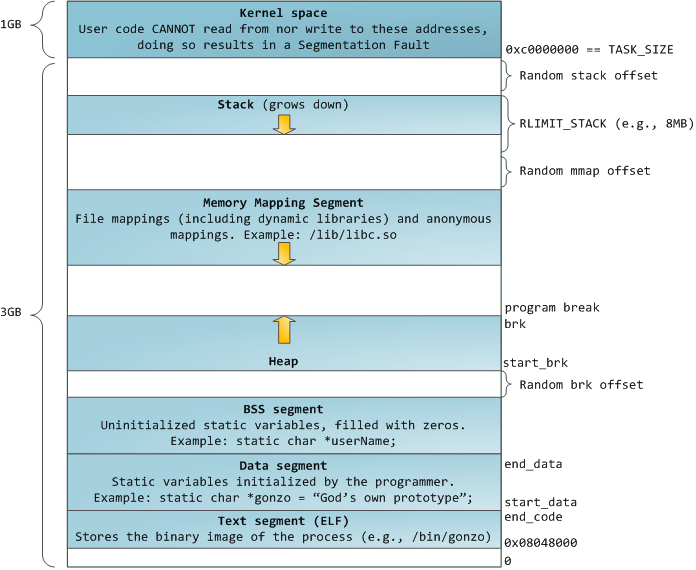
用户进程通常情况只能访问用户空间的虚拟地址,不能访问内核空间虚拟地址。只有用户进程进行系统调用(代表用户进程在内核态执行)等情况可访问到内核空间; 用户空间对应进程,所以当进程切换,用户空间也会跟着变化; 内核空间是由内核负责映射,不会跟着进程变化;内核空间地址有自己对应的页表,用户进程各自有不同额页表。
从程序角度看,我们谈到的地址空间一般是虚拟地址空间,通过malloc或new分配的内存都虚拟地址空间的内存。虚拟地址空间与物理地址空间的都是以page为最小管理单元,page的大小因系统而异,一般都是4KB。虚拟地址空间有到物理地址空间的映射,如果要访问的虚拟地址空间没有映射到物理地址空间,操作系统会产生缺页中断,将虚拟地址空间映射到物理地址空间。
因此,程度的虚拟地址空间比物理的地址空间要大的多。在较多进程同时运行时,物理地址空间有可能不够,操作系统会将一部物理地址空间的内容交换到磁盘,从而腾挪出一部分物理地址空间来。磁盘上的交换区,在linux上叫swap area,windows时叫page file。
android底层基于linux,不过android是没有交换区的(为什么没有?),所以android系统的内存资源就更加宝贵。为更合理、充分利用有限内存资源,android引入一个low-memory-killer机制,在内存不足,根据规则回收一部分低优先级的进程,从而释放他们占有的内存。
进程的内存空间只是虚拟内存,而程序运行需要的是物理内存(ram),在必要时,操作系统会将程序运行中申请的虚拟内存映射到ram,让进程能够使用物理内存。进程所操作的空间都是虚拟地址空间,无法直接操作ram。java程序发生OOM并不表示ram不足,如果ram真的不足,android的memory killer就会发挥作用,它会杀死一些优先级比较低的进程来释放物理内存,让高优先级程序得到更多的内存。
Android系统给每个进程分配了一定的虚拟地址空间大小,进程使用的虚拟空间如果超过阈值,就会触发OOM。所以只可能是线程太多,消耗了大部分虚拟内存地址空间,从而引发了当前进程空间不足。
adb shell dumpsys meminfo packagename 可以查看占用的内存信息
PD1806:/system/bin $ dumpsys meminfo com.example.oom
Applications Memory Usage (in Kilobytes):
Uptime: 31807223 Realtime: 31807223

** MEMINFO in pid 11380 [com.example.oom] **
                   Pss  Private  Private  SwapPss     Heap     Heap     Heap
                 Total    Dirty    Clean    Dirty     Size    Alloc     Free
                ------   ------   ------   ------   ------   ------   ------
  Native Heap    64227    64176        0       28    77824    72483     5340
  Dalvik Heap     2158     2124        0       24     3590     2693      897
 Dalvik Other    20804    20804        0        0
        Stack       92       92        0        0
       Ashmem        2        0        0        0
      Gfx dev      892      892        0        0
    Other dev       12        0       12        0
     .so mmap     8595      212     6180       16
    .apk mmap     2388     1964       60        0
    .ttf mmap      105        0        0        0
    .dex mmap     2375      176      552        0
    .oat mmap      176        0      112        0
    .art mmap     6796     6356      120        0
   Other mmap       60        4        4        0
   EGL mtrack    29808    29808        0        0
    GL mtrack     3000     3000        0        0
      Unknown    44350    44332        0        1
        TOTAL   185909   173940     7040       69    81414    75176     6237

 App Summary
                       Pss(KB)
                        ------
           Java Heap:     8600
         Native Heap:    64176
                Code:     9256
               Stack:       92
            Graphics:    33700
       Private Other:    65156
              System:     4929

               TOTAL:   185909       TOTAL SWAP PSS:       69

 Objects
               Views:       27         ViewRootImpl:        1
         AppContexts:        5           Activities:        1
              Assets:        7        AssetManagers:        0
       Local Binders:       14        Proxy Binders:       31
       Parcel memory:        4         Parcel count:       20
    Death Recipients:        1      OpenSSL Sockets:        0
            WebViews:        0

 SQL
         MEMORY_USED:        0
  PAGECACHE_OVERFLOW:        0          MALLOC_SIZE:        0
查看当前手机的内存信息可以通过cat /proc/meminfo来查看
1|PD1806:/ $ cat /proc/meminfo
MemTotal:        5772000 kB
MemFree:          129500 kB
MemAvailable:    2594764 kB
Buffers:            3968 kB
Cached:          2330100 kB
SwapCached:        12780 kB
Active:          2678740 kB
Inactive:         759120 kB
Active(anon):     804284 kB
Inactive(anon):   303532 kB
Active(file):    1874456 kB
Inactive(file):   455588 kB
Unevictable:        3500 kB
Mlocked:            3500 kB
SwapTotal:       2097148 kB
SwapFree:         488020 kB
Dirty:                60 kB
Writeback:             0 kB
AnonPages:       1102064 kB
Mapped:           743796 kB    映射文件大小
Shmem:              1416 kB
Slab:             548448 kB
SReclaimable:     241428 kB
SUnreclaim:       307020 kB
KernelStack:      171856 kB
PageTables:       108432 kB
NFS_Unstable:          0 kB
Bounce:                0 kB
WritebackTmp:          0 kB
CommitLimit:     4983148 kB  // 请的内存总数超过这个阈值就算overcommit,CommitLimit 就是overcommit的阈值,申请的内存总数超过CommitLimit的话就算是overcommit。
Committed_AS:   131533804 kB // 表示所有进程已经申请的内存总大小,(注意是已经申请的,不是已经分配的),如果 Committed_AS 超过 CommitLimit 就表示发生了 overcommit,超出越多表示 overcommit 越严重。Committed_AS 的含义换一种说法就是,如果要绝对保证不发生OOM (out of memory) 需要多少物理内存。
VmallocTotal:   263061440 kB
VmallocUsed:           0 kB
VmallocChunk:          0 kB
CmaTotal:         217088 kB
CmaFree:            1740 kB
NR_KMALLOC:        23312 kB
NR_VMALLOC:        33844 kB
NR_DMA_NOR:            0 kB
NR_DMA_CMA:        58348 kB
NR_ION:           268600 kB
free_ion:         121060 kB
free_ion_pool:    121060 kB
free_ion_heap:         0 kB
NR_GPU:           267812 kB
free_gpu:         154260 kB
zram_size:        609440 kB
zcache_size:           0 kB
pcppages:           6944 kB
ALL_MEM:         5675448 kB
- Virtual Memory and Linux
- Android进程的内存管理分析
- Android系统匿名共享内存(Anonymous Shared Memory)C++调用接口分析
- Android系统匿名共享内存Ashmem(Anonymous Shared Memory)驱动程序源代码分析
- Android系统匿名共享内存Ashmem(Anonymous Shared Memory)简要介绍和学习计划
- 虚拟内存那点事
- 邮箱 :charon.chui@gmail.com
- Good Luck!